
SPL Rendering (Settings)#
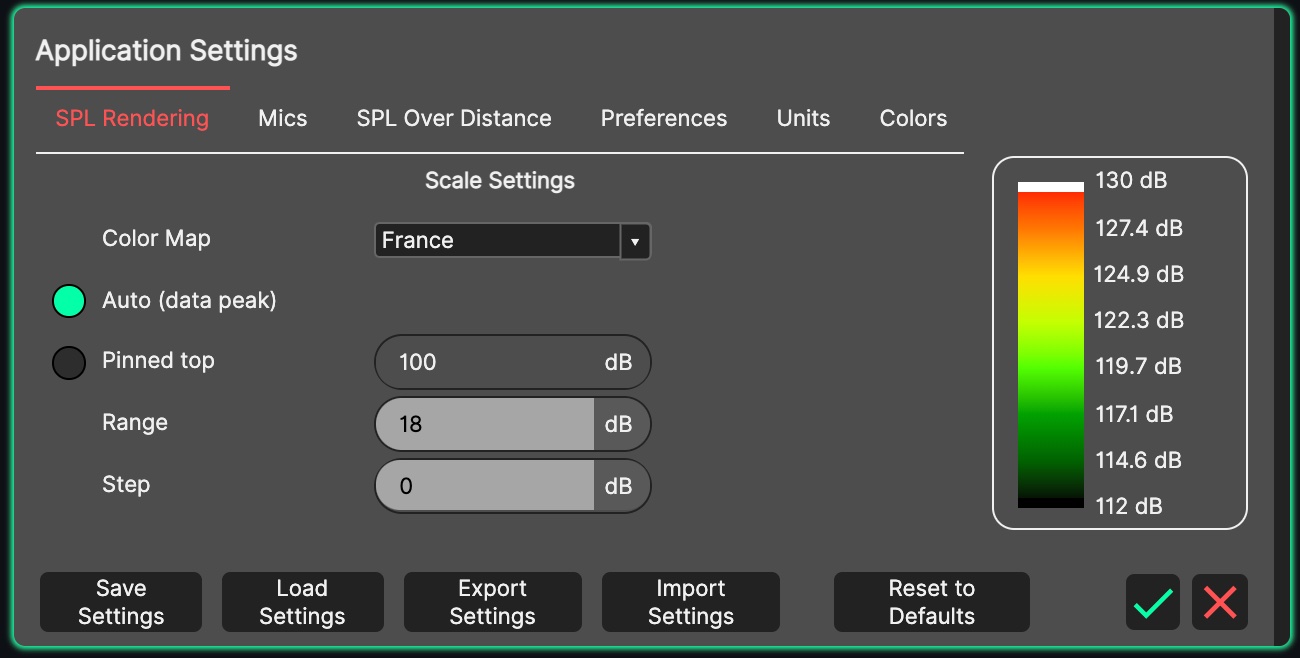
These settings define the default behaviour of the colour scale used by the pressure mapping. A live preview of the resulting scale is shown beside the controls.
- Colour Map
There are six choices of colour map provided:
Rainbow - a traditional colour map seen in many other visualisation applications. This is the default colour map for System Optimiser.
Inferno - a perceptually uniform colour map with monotonically increasing luminance, suitable for the visualisation of scientific data.
Cividis - a colour map engineered to provide a near identical representation of data for both people with and without forms of colour vision deficiency.
France, Germany 3 and Germany 6 - additional colour bands offering better real-world venue coverage representation.
- Auto (data peak) / Pinned top
These options choose how the top of the colour scale is determined:
Auto (data peak) - the top of the scale follows the highest value of pressure detected within the mapping. This is the default, and is useful when switching frequently between different frequency ranges of mapping, as there are naturally different ranges of pressure for different frequency ranges.
Pinned top - the top of the scale is fixed at the level entered in the dB field, and no longer follows the data.
The top of the scale can also be pinned directly from the 3D View: double-click the SPL legend to pin or release it at the current peak, or right-click the legend to type an exact top level.
- Range
The minimum limit of the scale is the top of the scale with the range subtracted. The default is 18 dB.
- Step
The pressure mapping can be discretised into bands of [Step] dB. This has the effect of creating bands of colour within the mapping, useful for qualifying which areas of the audience fall within which band. The default of 0 dB produces a continuous gradient with no discrete steps.
Note
The heat map’s stimulus, level, band and weighting are not chosen here - they are selected in the 3D View’s header while the SPL switch is on, default to Pink Noise / -8 dBu / Broadband / A-weighted, and are saved with each project. The Colour Map chosen here is also used by the Heatmap and Attenuation modes of the Sideview’s SPL map.