
SPL Over Distance (Settings)#
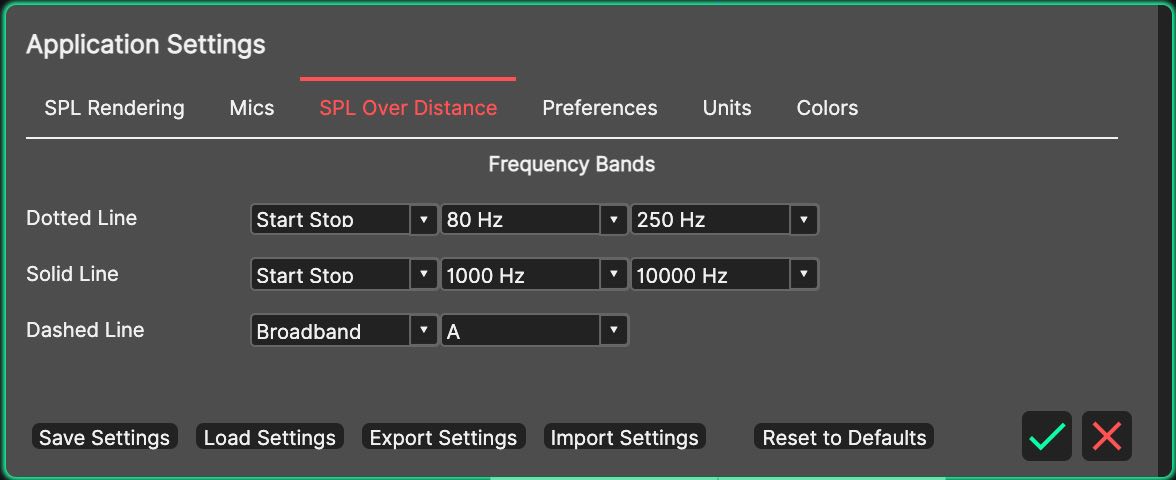
These settings define the frequency bands plotted by the SPL over Distance Panel.
- Frequency Bands
The SPL over Distance Panel plots up to three traces per audience area - dotted, solid and dashed - each showing an SPL band of your choice. The ‘Dotted Line’, ‘Solid Line’ and ‘Dashed Line’ rows each provide:
A band-category dropdown to select the type of band, including ‘Broadband’ and ‘Start Stop’ for a free frequency range. The Dashed Line also offers ‘Off’.
A frequency dropdown to select the band centre (hidden for Broadband), or the start frequency in ‘Start Stop’ mode.
A second frequency dropdown for the stop frequency, shown only in ‘Start Stop’ mode.
A weighting dropdown, shown only for Broadband. The default is Z (unweighted).
By default, the dotted line shows 80-250 Hz, the solid line 1-10 kHz, and the dashed line is Off. Use the dashed line to add a third band - for example the Broadband, A-weighted level - without losing the other two.