
Preferences (Settings)#
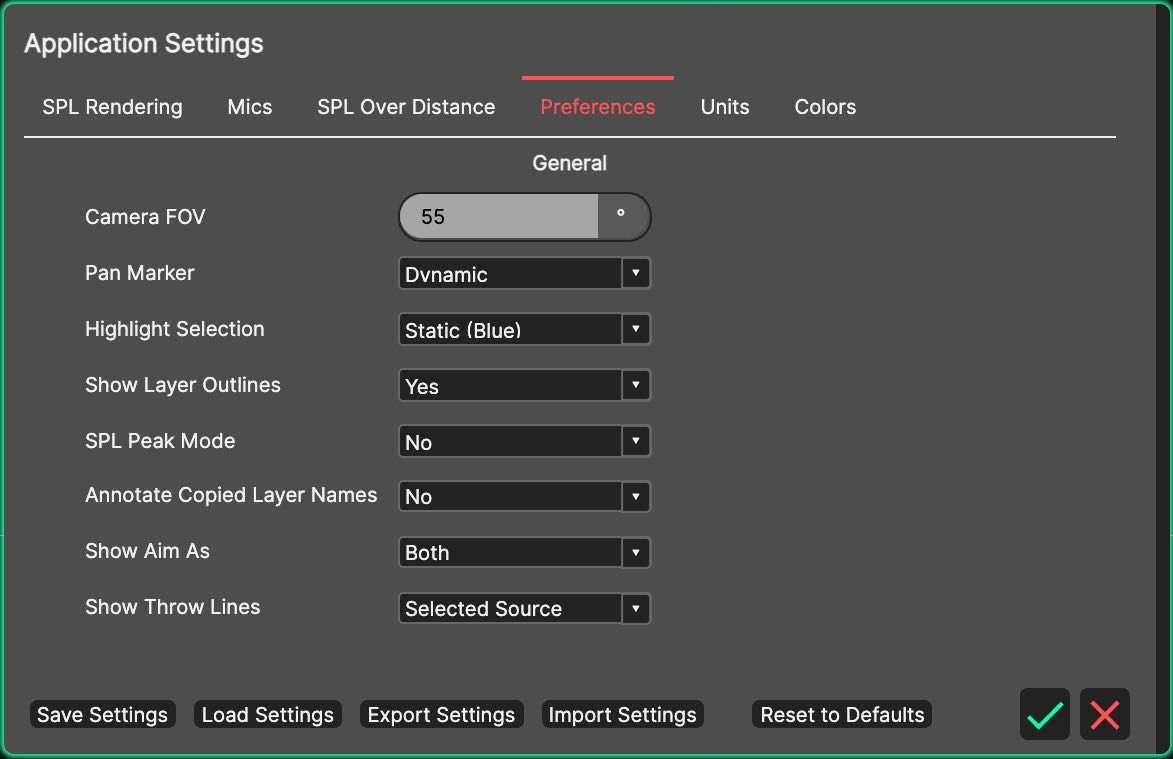
- Camera FOV
Sets the field of view of the 3D View camera, between 1 and 179 degrees, allowing the perspective to be tailored to your preference.
- Pan Marker
The Pan Marker is used to display the point about which the 3D View is orbited.
- Highlight Selection
The Highlight Selection drop-down list is used to choose how a selected source is highlighted in the 3D View.
Disabled - no highlight is drawn.
Static (Blue) - the selection is outlined in blue.
Dynamic Colour - the selection is outlined in a colour assigned dynamically.
- Show Layer Outlines
Enables or disables the outlines of layers in the 3D View. It can be useful to turn these off when taking screenshots to make a system design more aesthetically pleasing.
- SPL Peak Mode
By default, System Optimiser shows RMS sound pressure levels. If you need peak levels (i.e. the crest factor is added on top), you can turn on this option. CODA recommends to only use this option in rare exceptions.
- Annotate Copied Layer Names
Chooses whether duplicated, mirrored and imported layers are renamed (“Copy of …”, “Mirror of …”, “… - Imported”) or keep their original names.
- Show Aim As
Chooses how cabinet aiming is shown in the 3D View: Aim Discs, Throw Lines or Both (the default). See Aim Discs, Throw Lines and Lasers.
- Show Throw Lines
Shown unless Show Aim As is set to Aim Discs. Chooses whether Throw Lines are drawn for the Selected Source only (the default) or Always, for every visible source.